
Say goodbye to campaign guesswork—Audience Insights gives a clear view into anonymous visitors, empowering smarter, data-driven decisions that boost conversions. Uncover who’s engaging, what resonates—empowering you to confidently adjust strategy, messaging, and spend based on real data.
The fine print
- Audience Insights is available as an add-on feature for Leadpages customers.
- Insights are not available for EU citizens & residents.
- Audience Insights are not available in sub-accounts.
- Insights cannot be collected from WordPress published pages.
- Identified visitors will show up right away, whereas you'll need at least 2,000 unique monthly views to get Audience Overview insights
- Audience Overviews are continuously updated based on data from the past 7 days.
- Audience Insights monitor traffic across all Leadpages content including landing pages, on-page pop-ups, sites, and conversion tools (embeddable pop-ups, alert bars).
How does it work?
Once Audience Insights is enabled on your account, it automatically starts collecting data from visitors to your Leadpages content. We identify as many visitors as possible and add them to your visitor table as well as group them into easy-to-understand audiences based on key traits like industry, company size, behavior, etc.
Add Audience Insights to your plan
Ready to start learning more about your anonymous traffic? Adding Audience Insights to your plan takes just a few steps:
- Go to your Leadpages dashboard
- Select Audience Insights in the left navigation menu
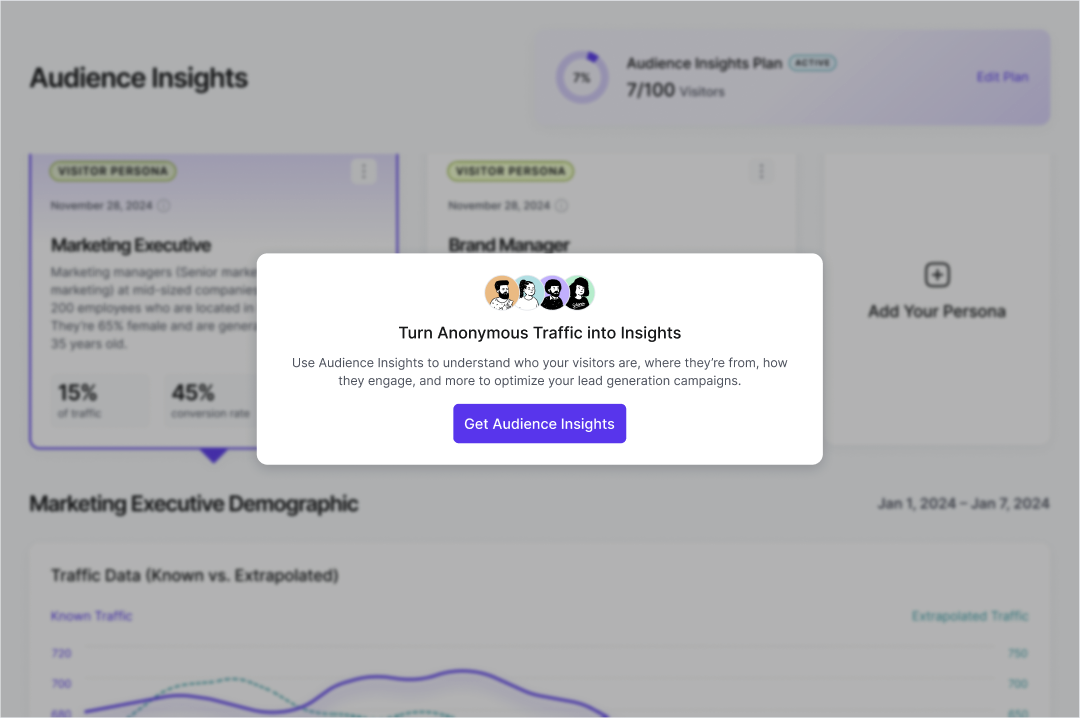
- Click Get Audience Insights, then select the plan that best fits your traffic needs
- Confirm the purchase and you’re in!
- Next, we will begin collecting insights so be sure to drive traffic to your pages.
A few important things to note:
- Your visitor allotment will be refreshed each month.
- If a visitor cannot be identified, they will not count against your monthly allotment.
Identified Visitors
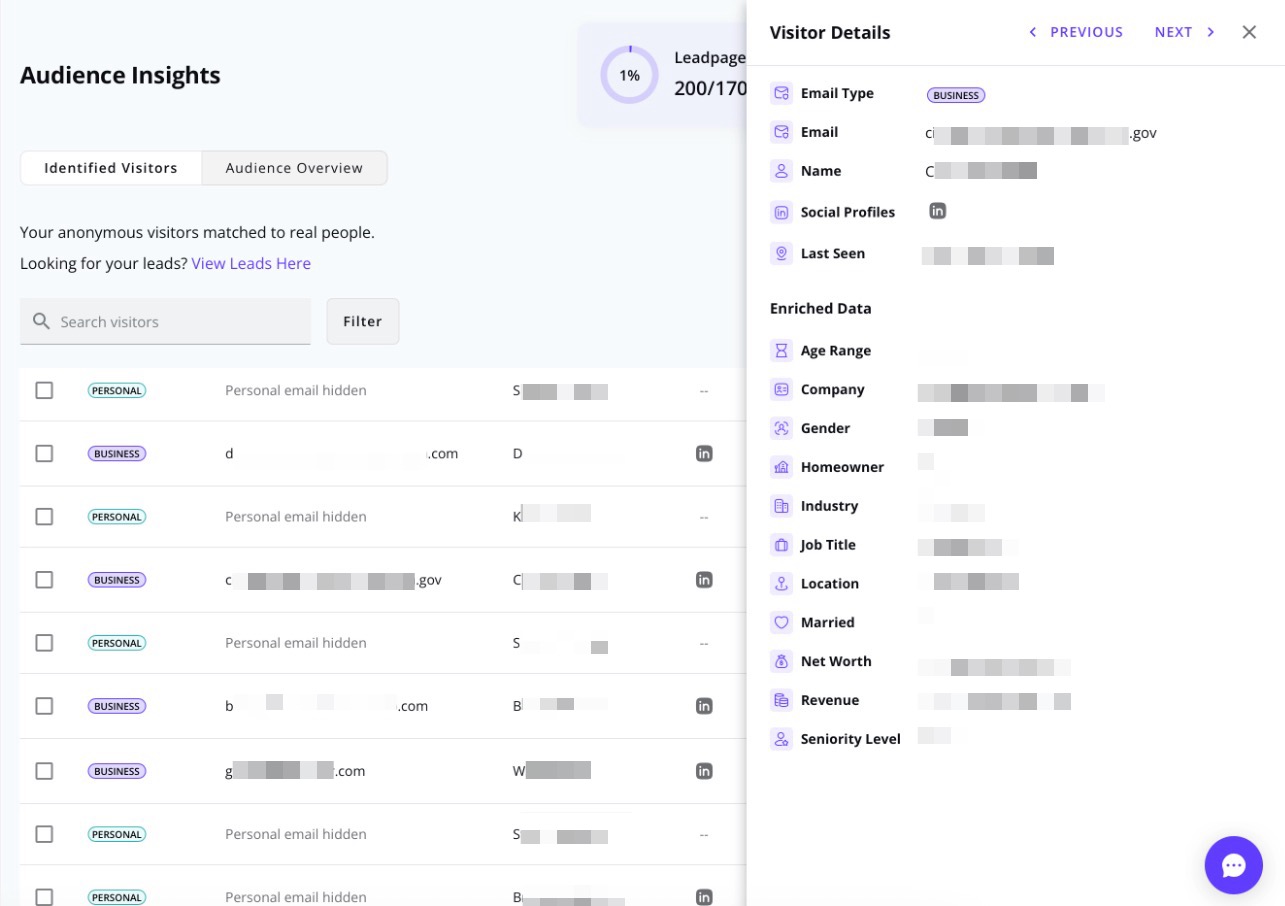
When someone visits any of your published assets—such as a landing page, website, pop-up, or alert bar—Audience Insights automatically searches for publicly available data to add to their visitor profile. In the Identified Visitors table, you’ll see details like name, email, company, location, and more as soon as a visitor is matched. There’s no traffic minimum required to get identified visitor insights—just keep in mind that not every visitor will be matched. The more traffic you send to your pages, the more likely we'll be able to generate matches.
In the Identified Visitors tab, you can also search, filter, and export your visitor data.
Visitor Details
Click on the visitor to view more details in the Visitor Details side panel. Depending on the publicly available data for that visitor, you may see additional insights such as:
| Age Range | Business Email | Company | Company Domain |
| Company Revenue | Department | Gender | Homeowner |
| Industry | Job Title | Location | Married |
| Name | Net Worth | Seniority Level | Social profiles |
Search & Filter
Within your Leads Library, you can use the search bar to look up keywords, email addresses, names, and more. You can also sort and filter your leads to help you find exactly what you need.
Sort Options
You can sort your visitors by:
- Email address
- Name
- Social
- Job Title
- Company
- Location
- Last Seen
Just click on the column headers to sort in ascending or descending order.

Filter Options
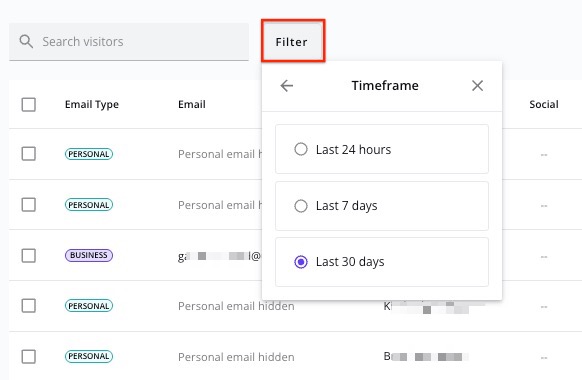
Use the filters to narrow down your results based on:
- Timeframe: Last 24 hours, Last 7 days, Last 30 days
- Email Type: Personal, Business
- Job Title
- Industry
Export Visitors
Want to import your CSV data to your CRM? Just use the Export button.
To export, select the top checkbox to include all visitors in your search, or check individual visitors manually. Next, click Export, confirm your selection, and click Export again to begin generating the CSV file.
Once it’s ready, the CSV file will automatically download to your computer.

Audience Overview
This view summarizes trends and generates personas based on your identified visitors. To ensure accuracy, Audience Overview insights are only available once you receive at least 2,000 unique visitors per month.
Personas
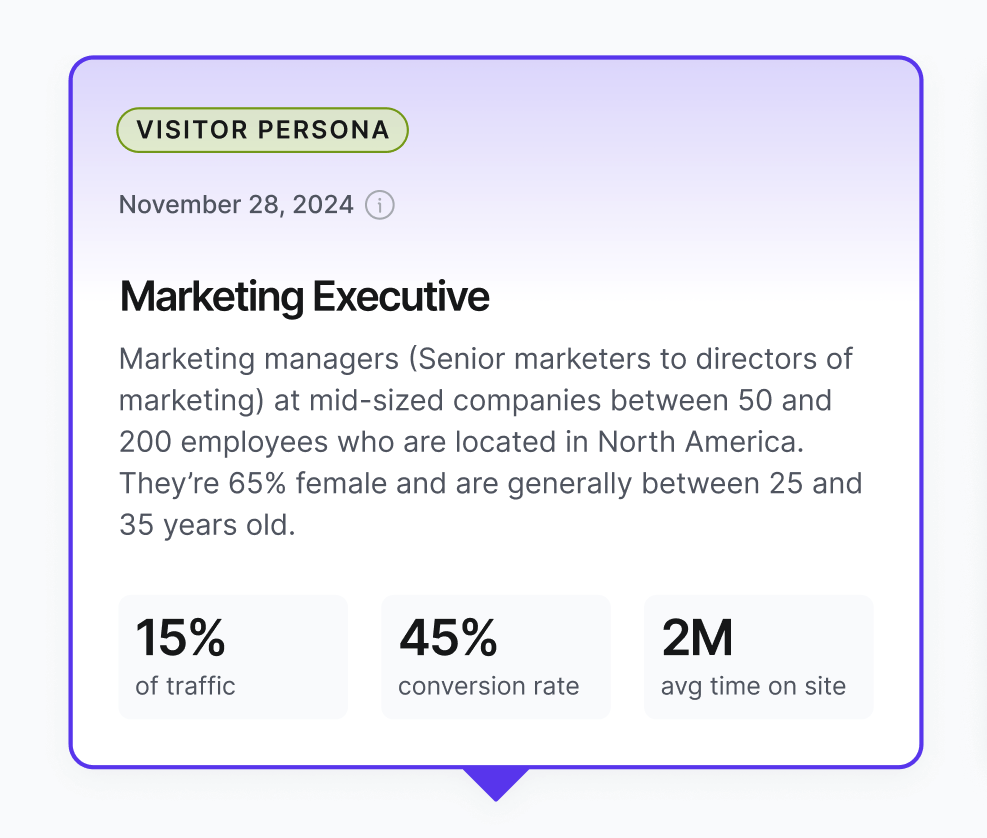
Personas represent a combination of common demographics found in your anonymous traffic. Once you have personas available, insights are available real-time. New personas are evaluated every 7-days. There are two types of personas in Audience Insights— Visitor Personas & Your Personas.
Visitor persona
Visitor Personas are the top personas Leadpages identifies from your anonymous traffic. These personas are created for you and cannot be edited. We re-evaluate your anonymous traffic and check for new trends every 7-days. If a new persona is detected, the old persona will be replaced.
Your persona
Add your own custom persona(s) to easily monitor insights for the persona you want to attract. Adding your own persona empowers you to compare your desired customer persona(s) with the personas Leadpages identifies from your traffic.
Add your persona
- Define your target audience by clicking Add Your Persona.
- Name your persona and fill in their demographics.
- Click Save Persona and we’ll get to work identifying insights.
Once your persona is set up, we’ll start analyzing your traffic to find visitors who fit the profile. Insights for that persona will appear right in your dashboard.
Not getting as many insights as you’d hoped? Try widening your persona’s criteria or set up a new one to explore other segments of your audience.

Delete your persona
- Click the Actions icon in the top right corner of your persona.
- Select Delete.
- Confirm you want to delete your persona.
All Traffic Persona
Want a quick way to see insights about all of your traffic, not just specific visitors? Create a persona with no filters applied. This will give you a broader understanding of who’s landing on your pages.

Insights
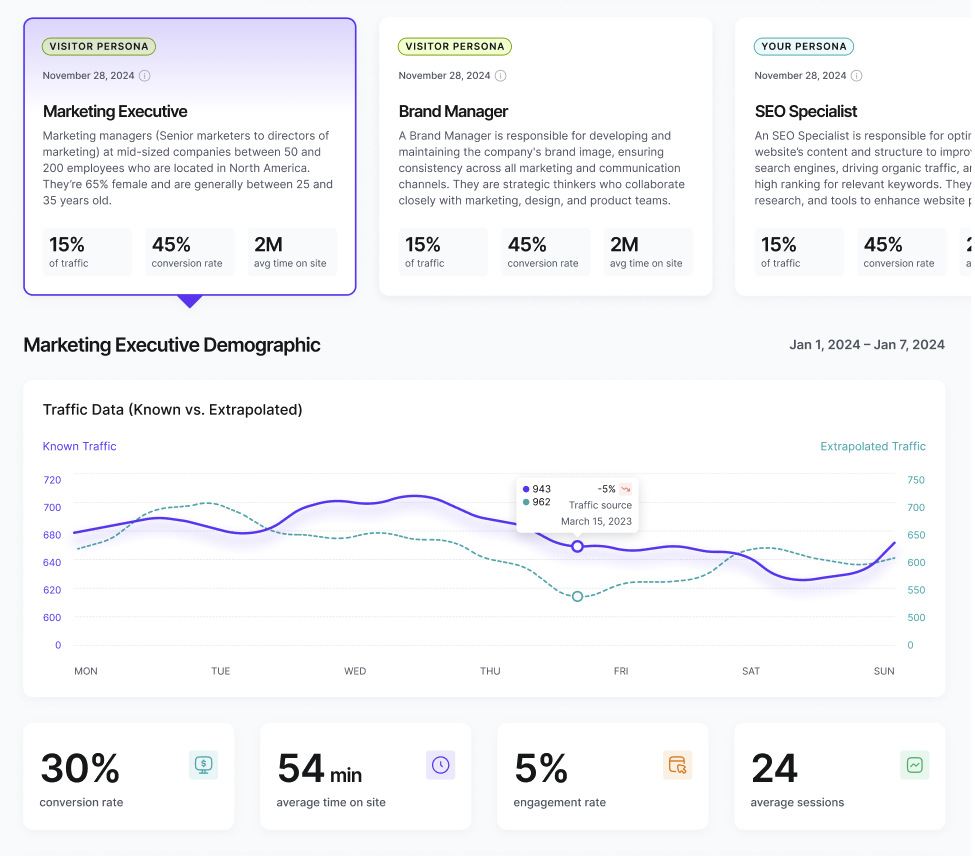
Your dashboard gives you a rolling 7-day snapshot of the people behind your traffic—highlighting attributes that help you refine, realign, and reallocate your marketing strategy.
| Insight Area | What You’ll Learn |
| Behavioural Metrics | Avg. session length, engagement rate, and conversion rate |
| Page & Campaign Performance | Which landing pages and campaigns are driving traffic |
| Top Companies | Company-level data on who’s visiting your site |
| Geographic Locations | Where your traffic is coming from—globally and regionally |
| Top Industries | Leading industries engaging with your content |
Easily identify trends with visual summaries—no complex data analysis is required!
Data-driven actions
Now that you understand more about who is engaging, you can confidently adjust strategy, messaging, and spend based on real data.
Remember to continuously monitor your audience data and adjust your strategies accordingly to stay ahead of the curve.
Actionable insight examples:
-
Noticing low engagement from top audience segments? Rework your copy and CTAs to better reflect their language, pain points, and motivations for a stronger connection.
-
Seeing a concentration of traffic from specific industries or regions? Refine your ad targeting using geolocation and industry data to focus on the audiences most likely to convert.
-
Are top companies visiting your pages but not converting? Share that company visit data with your sales team to support personalized ABM outreach and timely follow-ups.
-
Is one audience segment consistently engaging more than others? Customize your messaging and offers to match their specific needs, boosting relevance and conversion potential.
-
Surprised by unexpected traffic from new regions or industries? Explore these as potential growth areas—test localized offers or new campaign angles tailored to these visitors.
- Experiencing high bounce rates on certain pages? Use your audience insights to identify potential misalignment and update your page content, structure, or CTAs to better fit visitor expectations.
Frequently Asked Questions
Do I need a third-party analytics tool to use this?
Nope! Audience Insights is fully integrated into Leadpages—no setup or external platforms required. Just enable the feature, send traffic to your pages and watch the insights come in.
Is this feature privacy compliant?
Yes, we adhere to all applicable privacy laws through our own policies and the system’s safeguards. View our privacy policy here.
How much traffic do I need to start seeing insights?
We recommend a minimum of 2,000 views across all content to begin generating actionable insights.
Can I share this data with my team?
Yes! You can save personas and share dashboard views with anyone on your account. Check out how to add your teammates here.
Can I customize the audience I want to compare my data against?
Absolutely. You can create your own personas and compare how your actual traffic aligns with your goals.
What happens if I cancel my Audience Insights add-on?
If you cancel your subscription, you’ll lose access to your traffic insights, and any collected data will be permanently deleted. But don't worry—you can re-subscribe anytime, and we’ll start tracking your traffic again from that point on.
What happens if I go over my monthly visitor allowance?
If you exceed your monthly allowance, we'll let you know. Each plan has an overage rate that may apply if you go over your limit and stay on your current plan.
Will Audience Insights work on my pages published via HTML?
Yes! Audience Insights is supported on pages published this way.
Need more help?
You can always get in touch with our support team—just click Support in your Leadpages navigation menu, or submit a ticket ↗